
Cashwin Casino Login – Sign In to Your Account
If you are itching to get back into your favourite slots, live tables, or sports bets, logging into your Cashwin Casino account should feel quick, simple, and secure every single time.
We built the Cashwin Casino login and account tools so you can sign in from any device in seconds, keep your profile safe, and fix most access issues without stress.
How to Login to Cashwin Casino
You can log into Cashwin from any modern browser, whether you are on a PC, laptop, tablet, or smartphone, and the process is basically the same everywhere.
Login Process Step-by-Step
Let’s walk through the login flow exactly as you will see it on the Cashwin Casino site.
- Open the official Cashwin website
- Launch your preferred browser (Chrome, Safari, Firefox, Edge, etc.).
- Type in the official Cashwin URL or use a bookmark you saved earlier.
- Make sure the address bar shows the correct domain and a secure padlock icon, which indicates an encrypted connection.
- Find and click the Login button
- On both desktop and mobile versions, the Login button sits in the top-right corner of the homepage.
- Tap or click it to open the Cashwin Casino login form.
- Enter your credentials
- Type your registered email address in the first field.
- Enter your password in the second field, keeping an eye on the caps lock and keyboard layout.
- Confirm and sign in
- Click the Submit / Login button under the form.
- If everything is correct, you will be redirected to the main lobby or your personal dashboard.
- Complete two-factor authentication (if enabled)
- If you have two-factor authentication switched on, you will see an extra step asking for a one-time code.
- Check your email or phone (depending on the configured method), enter the code, and confirm.
Once you are in, you can move between Casino, Live Casino, Sports, Promotions, and the Cashier using the top menu or mobile navigation.
Tips for smooth Cashwin Casino logins:
- Save the official site in your bookmarks so you do not accidentally click fake links.
- Use a password manager to avoid typing errors and keep your password strong.
- Always log out if you share your device with other people or use a public computer.
Password Recovery
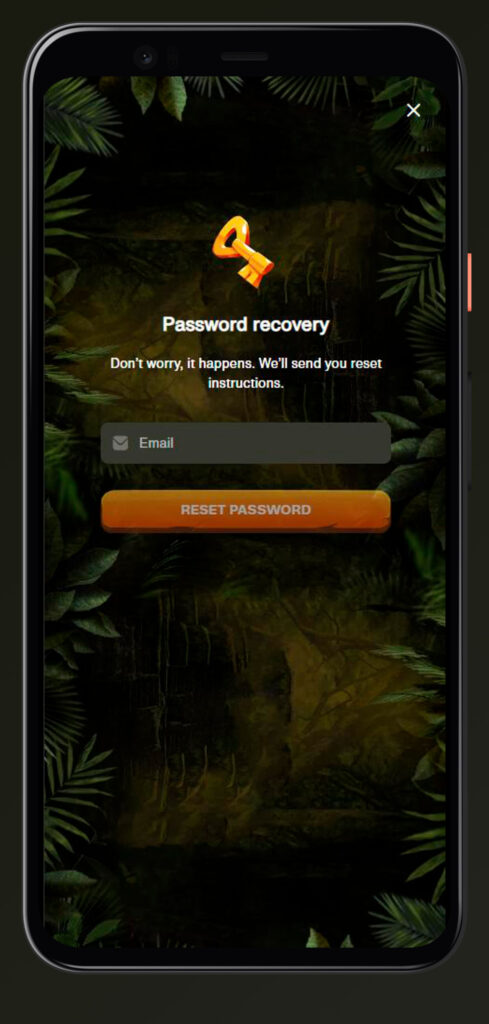
If your password refuses to come back to you, you do not need to panic or keep guessing it. Cashwin has a simple reset process.
- Go to the Cashwin login page and click Forgot Password just below the password field.
- Type in the email address you used when you registered your Cashwin Casino account and submit the form.
- Open your email inbox and look for a message from Cashwin with a reset link.
- Click the link in the email and follow the instructions to set a new password (ideally a strong one you have not used before).
- Go back to the Cashwin site and log in with your email and your freshly created password.
If the email does not arrive within a few minutes:
- Check spam, junk and promotions folders.
- Make sure you entered the correct email without typos.
- If still nothing, reach out to support via live chat or email for manual assistance.
Account Security Features
We know you are putting real money and personal details into your Cashwin account, so security is not optional; it is mandatory.
Two-Factor Authentication
Two-factor authentication (2FA) adds a second lock to your account on top of your password.
- When 2FA is enabled, logging in always has two steps:
- Enter your email and password as usual.
- Enter a unique code sent to your email or phone for that login.
- The code is time-limited and can only be used once, which means even if someone somehow gets your password, they still cannot access your account without this second step.
Why it matters:
- Protects you if your email/password combination leaks somewhere else on the internet.
- Adds security when you log in from public or shared networks like cafes, offices, or hotels.
- Gives you more control and peace of mind if you often use multiple devices.
If you ever suspect someone tried to access your account, change your password immediately and keep 2FA turned on.
Session Management Across Devices
You might log into Cashwin from a laptop at home, then from your phone on the go, and maybe even a tablet.
- Your Cashwin balance and profile are shared across all devices in real time.
- The system can limit simultaneous logins or log you out of older sessions if suspicious patterns are detected.
- You can always manually log out from the menu when you finish your session on any device.
If you see strange session messages or your account behaves oddly, change your password and contact support to check recent activity.
New Account Registration
If you have not opened a Cashwin Casino account yet, the sign-up process is built to be fast and straightforward, even for complete beginners.
Step-by-Step Registration Guide
Let us go through the full Cashwin Casino sign-up process once.
- Open the Cashwin homepage
- Use your browser to go to the official Cashwin site.
- Click Sign Up / Register at Cashwin Casino
- The button is usually in the top-right corner, near the login button.
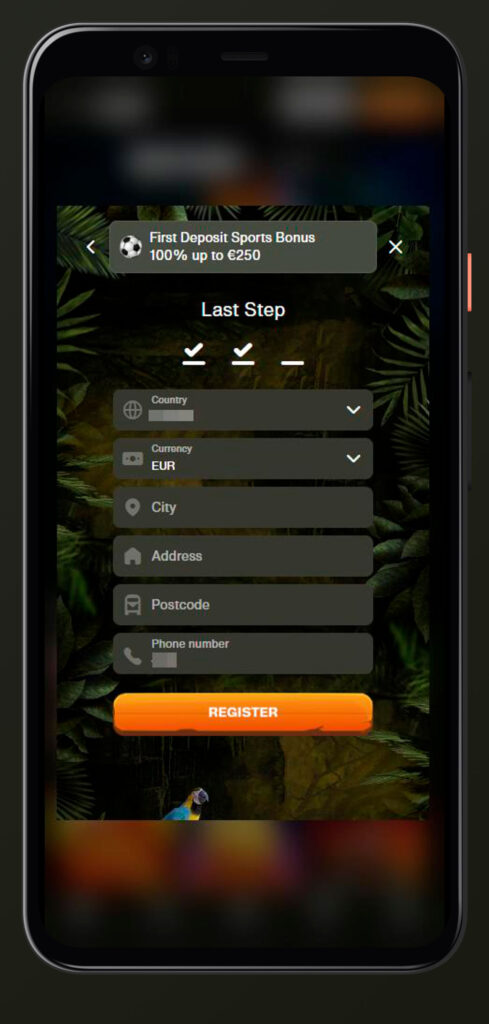
- Fill in the Cashwin Casino sign-up form
- Enter your first and last name, date of birth, and country of residence.
- Provide your home address, city, and postcode.
- Add your mobile phone number and email address.
- Choose your account currency and create a strong password.
- Agree to the terms
- Tick the box confirming that you accept the Terms & Conditions and that you are old enough to gamble according to your jurisdiction.
- Submit the form
- Click the Register / Create Account button at Cashwin Casino.
- Verify your email
- Check your inbox for the verification email and click the link inside to activate your account.
Once this is done, you can log in, make your first deposit, and start playing.
Required Information for Account Creation
We are not asking for details to be nosy; we are asking because regulations demand it, and it protects both you and us in the long run.
During the Cashwin Casino sign-up, you will be asked for:
- Personal details: full name, date of birth, and gender, in some cases.
- Contact details: email, mobile phone number, residential address including city and postcode.
- Account settings: preferred currency, language, and a secure password.
Later, during KYC (Know Your Customer), you will need to prove this info with documents like your ID and a utility bill, so always enter real, accurate data.
Email Verification Process
Email verification is a small but critical step.
- Right after registration, Cashwin Casino sends a verification email to the address you used.
- You need to open that email and click the embedded link to prove that the address belongs to you.
- Once confirmed, your account status changes from “pending” or “unverified” to “active”, which allows normal login and use.
If you skip this, you may run into issues with password recovery or promotions later, so it is best to verify right away.
Personal Account Dashboard
When you log in, your personal dashboard is where you control your Cashwin life: your details, your money, and your bonuses.
Profile Settings
This is the section where you can manage your personal data and some important controls.
In profile settings, you can:
- Update your address and phone if you move or change numbers.
- Adjust communication preferences so you receive only the types of emails you want (for example, only important info or also promos).
- See your Cashwin Casino verification/KYC status and upload required documents directly through the upload interface.
- Access responsible gaming options such as deposit limits, loss limits or self-exclusion if you need a break.
Keeping everything accurate here makes support and withdrawals much smoother.
Transaction History
Your dashboard also includes a transaction history section, which is your financial timeline with us.
There you can:
- Review all deposits and withdrawals you have made, with amounts and dates.
- See the status of any recent payout requests (pending, approved, processed).
- Sometimes, filter or export records if you need them for your own budget tracking or to talk to your bank/wallet provider.
If there is ever a question about a payment, this section is the first place we and you will both look.
Active Bonuses
We know you probably care about your bonuses as much as your balance, so the dashboard shows them clearly.
In the bonuses area, you will:
- See all active bonuses attached to your account, including casino, sports, and free spins offers.
- Check remaining wagering requirements, eligible games, and expiry time for each bonus.
- Activate new promotions from the list when you make a qualifying deposit.
This makes it easy to know where you stand before you decide to withdraw, so you do not accidentally forfeit a bonus you still wanted to use.
Login Issues & Solutions
Even with a slick system, things can go wrong. Here is how to deal with the most common login problems at Cashwin.
Forgot Password Recovery
If you forget your password, the trick is to reset it rather than hammer the Cashwin login form with guesses.
- Click Forgot Password under the Cashwin login fields.
- Enter your registered email and send the request.
- Use the link in the reset email to set a new password.
- Log back in with your fresh credentials.
Avoid repeated wrong attempts, as too many failures can trigger temporary protective locks on your account.
Account Lockout Assistance
Sometimes, security systems might temporarily lock you out if they detect unusual activity, such as too many failed logins or logins from unusual locations.
If that happens:
- Stop trying to log in for a moment.
- Contact Cashwin Casino’s support via live chat or email with your registered email and basic personal info.
- Be ready to answer some verification questions or provide ID documents if needed, so we can safely confirm it is really you.
We would rather be extra-cautious and ask a few questions than risk unauthorised access to your funds.
24/7 Live Chat Support
Whenever you hit a wall with login or your Cashwin account dashboard, our support team is there.
- Use the live chat button on the site to start a conversation with a real agent.
- If you prefer email, write to the listed support address with details about your issue and any error messages you see.
- Support can help with: password resets, account lockouts, verification issues, and technical problems like pages not loading correctly.
Do not hesitate to contact us; that is literally what the team is there for.

FAQ
You will find the Login button at the top-right corner of the Cashwin homepage on both desktop and mobile; click it, enter your registered email and password, then press Submit to sign in.
Click Forgot Password on the Cashwin login page, enter your email, and follow the reset link sent to your inbox to create a new password, then log in with those new details.
You need to provide your full name, date of birth, address, country, phone number, email, and a password, choose your currency, and confirm your email via a verification link after registration.
Go to your personal account dashboard and open the transaction history section, where you can see all recorded deposits, withdrawals, and their status for your Cashwin account.
Yes, Cashwin offers live chat and email support, so you can contact an agent directly from the website to help with password resets, account unlocks, verification questions, and other login-related issues.